GL.iNet is a company that specializes in compact, open-source networking hardware — primarily travel routers, home routers, and IoT gateways. Their devices run a custom firmware called GL.iNet Admin Panel built on top of OpenWrt, giving you both an easy-to-use interface and full access to OpenWrt’s advanced configuration underneath.
One particularly powerful addition is the ability to install Tailscale directly on GL.iNet routers. Tailscale is a zero-config mesh VPN built on WireGuard that creates a secure private network across all your devices, handling NAT traversal and key management automatically. By running it on your GL.iNet router, every device on that network joins your tailnet without needing Tailscale installed individually — giving you seamless remote access to your home network and services from anywhere.
Below you will find notes on how to properly install Tailscale on your GL.iNet router and allow full routing, not only from the device itself, but also allow LAN networks to reach other tailscale endpoints and other exposed subnets
By default, tailscale version shipped with the router is an old one

To fix that, you can use the following community updater, that will
https://github.com/Admonstrator/glinet-tailscale-updater
wget -q https://get.admon.me/tailscale -O update-tailscale.sh ; sh update-tailscale.sh

root@GL-MT3600BE:~# ping 100.100.100.100
PING 100.100.100.100 (100.100.100.100): 56 data bytes
64 bytes from 100.100.100.100: seq=0 ttl=64 time=0.401 ms
64 bytes from 100.100.100.100: seq=1 ttl=64 time=0.203 ms
64 bytes from 100.100.100.100: seq=2 ttl=64 time=0.251 ms
^C
--- 100.100.100.100 ping statistics ---
3 packets transmitted, 3 packets received, 0% packet loss
round-trip min/avg/max = 0.203/0.285/0.401 ms
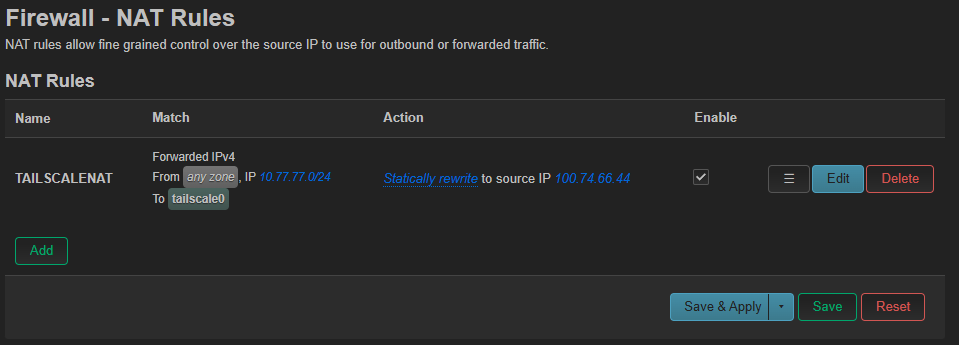
NAT